Texas Bonus Tax Calculator
Data compiled and maintained by Timmy · Updated 2026-10-03
Texas bonus tax calculator
How to Calculate Tax on a Bonus in Texas (Step by Step)
Walk through the Texas bonus tax calculator with a real $10,000 bonus and $70,000 salary example. Each screenshot shows exactly what to type and which option to pick, so you can see what lands in your account on payday.
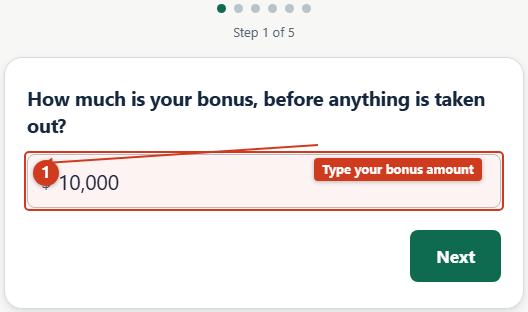
Enter your bonus amount
On the first card, type the bonus you received before any tax was taken out. Here we use a $10,000 bonus.
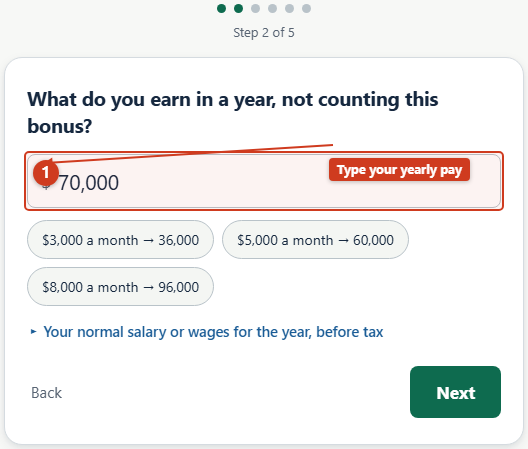
Enter your yearly pay
Click Next and type your annual salary, not counting this bonus. We use $70,000 a year.
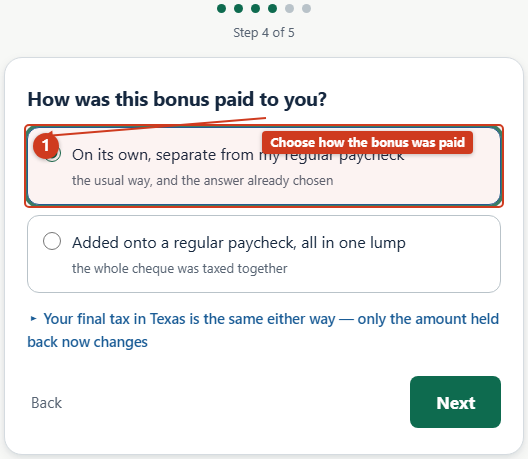
Choose how the bonus was paid
Click Next through filing status. On the payment card, pick how the bonus was paid to you — on its own (the default) or added to a regular paycheck.
Read your estimated take-home bonus
Click Next to the last card. The green figure is your estimated bonus after withholding, with a line-by-line breakdown below it.
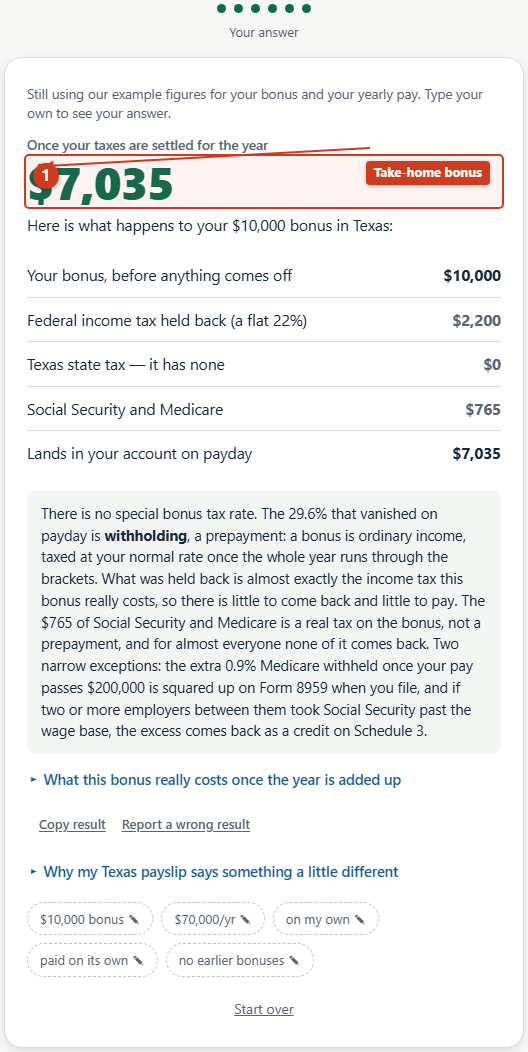
Tip: Enter your bonus and yearly pay, keep single filing and the default 'paid on its own' option, then click through to the answer. The figure is an estimate of take-home bonus pay, not tax advice.
Got a bonus in Texas? It isn't taxed at a special rate — what shrinks it is withholding. With no Texas income tax (it runs on a 6.25% state sales tax and local property taxes), the only bites are the flat 22% federal prepayment and FICA. Put in your figures above to compare what's withheld now with your real tax at filing — and the refund or shortfall. Everything runs in your browser.
The quick take: a stand-alone Texas bonus has a flat 22% federal tax withheld, nothing for the state, because Texas levies no income tax, plus 7.65% FICA. Treat it as money on account. The real tax is your marginal rate, reconciled on your return; the tool above shows the gap either way.
Estimate only, not tax advice — terms.
Texas has no bonus tax — so why is 22%+ still withheld?
Think of the flat rate as a deposit, not a bill. A bonus is taxed like any wages — at your marginal rate when the year's income runs through the brackets — and the 22% is only how it's withheld. Most people's real rate is under 22%, so the extra returns; higher earners above 22% owe more. Worked out for the $9,000 bonus here, about $900 returns as a refund. The lone exception is FICA (7.65%), which is a real tax rather than a prepayment.
A $9,000 bonus on a $36,000 Texas salary: withheld vs. actually owed
Picture a Texas worker on a $36,000 salary handed a $9,000 bonus, paid on its own:
- On the check: the employer holds back $1,980 for federal, $0 state, and $689 for FICA — $2,669 in all (29.6% of the bonus), leaving about $6,332.
- The real bill: at filing the bonus is taxed roughly $1,080 in income tax (federal $1,080), with the identical $689 FICA on top.
- The gap: you over-paid income tax by roughly $900, and that returns as a refund at filing. FICA ($689) stays either way — it's a real tax.
Example single-filer numbers from the calculator above; your own refund or bill shifts with your total income and filing status.
Texas bonus withholding, piece by piece
How the federal 22% works. A bonus identified separately from regular wages is withheld at a flat 22% federally (IRS Publication 15). A mandatory 37% hits supplemental pay beyond $1,000,000 a year; neither figure is a special "bonus" rate, both are withholding defaults.
Texas takes no cut. Because Texas has no state income tax, there's no state line on your bonus at all — the only withholding is the flat 22% federal and FICA. Texas has no personal income tax, and a 2019 constitutional amendment (Article VIII, Section 24-a) prohibits the state from levying one outright, so introducing one would require amending the Texas Constitution again.
FICA is the real tax. Social Security (6.2% to the wage base) and Medicare (1.45%, +0.9% above $200,000) are owed at the same rate they're withheld. Neither piece refunds at filing, so both columns of the tool show it unchanged; the income-tax withholding is the only part that trues up.
For your regular salary rather than a bonus, use the Texas paycheck calculator.
Bonus withholding in Texas next to Oklahoma, Louisiana and New Mexico
Take a $10,000 bonus for someone on $70,000 and compare Texas with bordering Oklahoma, Louisiana and New Mexico:
| State | Bonus method | State withheld | Total withheld |
|---|---|---|---|
| Texas | no state income tax | $0 | $2,965 |
| Oklahoma | flat 4.5% | $450 | $3,415 |
| Louisiana | aggregate (~3.09%) | $300 | $3,265 |
| New Mexico | flat 5.9% | $590 | $3,555 |
Total = federal 22% + state + FICA. Illustrative single-filer figures; the income tax you actually owe trues up at filing.
Texas bonus tax FAQ
What's the bonus withholding in Texas?
State withholding is zero because Texas taxes no wage income. The only deductions are the flat 22% federal (37% on bonus dollars above $1,000,000/yr) and 7.65% FICA, and the 22% is refundable if your real rate is lower.
Do I get a refund on my Texas bonus?
If 22% was more than your real rate, yes — the over-withheld income tax returns at filing. If your marginal rate tops 22%, you owe the shortfall. FICA doesn't come back either way.
Does Texas tax my bonus at all?
Texas charges no state income tax on it. You still owe federal income tax (a flat 22% is withheld, trued up at filing) and FICA on the bonus.
Are bonuses taxed at a higher rate in Texas?
No. A bonus is ordinary income taxed at your normal marginal rate when you file; the flat 22% withheld is a prepayment, not a tax rate.
Bonus tax calculators near Texas
Texas paycheck calculator · all state bonus tax calculators →
Sources
How we sourced these numbers
Every figure on this page is calculated, not estimated by hand. Federal income-tax withholding follows the IRS Publication 15-T (Federal Income Tax Withholding Methods), which is the method employers use to turn your W-4 and pay into a per-paycheck withholding amount. Brackets and the standard deduction come from the IRS annually; Social Security and Medicare rates and the wage base come from the Social Security Administration; state figures come from each state's revenue or labour agency, linked below. A person updates the underlying tax data and the calculator recomputes every figure at build time. This is an estimate for planning, not tax advice.
- IRS Publication 15 (2026) — Supplemental Wages (flat 22% / 37% above $1M)
- Texas income-tax status & rate: see the Texas paycheck calculator sources (state DOR, verified 2026-10-03).